Finlay Sheikh
Published on: 10.11.2026
Published at: 17.11.2026
Reading time: 3 minutes
How to register as self-employed
If you have started working for yourself, then you need to register as self-employed with HMRC to pay tax. The good news🎉:
Finlay Sheikh
Published on: 10.11.2026
Published at: 17.11.2026
Reading time: 3 minutes
- The registration process is straightforward
- You only need to do it once
- It covers both Income Tax and National Insurance contributions (NICs)
Hey, have you sorted your tax return yet?
Avoid costly mistakes and let Taxfix take care of it for you. Our UK-accredited accountants make filing quick and stress-free, starting from just £99.
StartIt’s my first time registering as self-employed!
If you haven’t registered as self-employed before, then follow these step-by-step instructions:
- Register online by creating a HMRC online account
- You’ll receive a user ID
- Log back into the HMRC online account, select “add a tax”, and then “Self Assessment”
- Select “Sole Trader” from the options: individual, sole trader, partnership , or trust
- Enter the date you started your self-employment
- Submit more details, including your National Insurance Number ( here’s how to get one )
- Describe the work you do: “security guard”, “Uber driver”, “freelance designer”, etc
- Review and click “submit”
- You’ll get a letter with your Unique Taxpayer Reference (UTR) number by post
- You’ll also receive another letter within 10 working days with an activation code. You’ll need this code to activate your UTR
You can also do this using the SA1 form: you can download it on HMRC’s website, fill it in, and send it by post. Bear in mind, this method takes additional time to reach HMRC.
🚨 You will need to register by 5th October. 🚨
Not sure if you need to register as self-employed?
If you need tax advice from a professional, use our tax consultation service. An accredited accountant can help you make sense of your tax liabilities and overall situation to make sure you’re keeping up-to-date.
Book nowIf you’ve sent a tax return before
The process is similar, but instead you will use the online CWF1 form .
Just use the same 10-digit unique taxpayer reference (UTR) number and HMRC login as last time.
If you work in the construction industry (CIS)
HMRC treats subcontractors working in construction (builders, painters, carpenters, etc.) differently.
Let HMRC know if you’re a construction worker and register for the Construction Industry Scheme (CIS) . Construction workers who aren’t registered for CIS will pay 30% tax instead of 20%.
If you’re employed
There are some cases when employed people will also have to register as self-employed.
For example: If you’re employed but also have taxable income from self-employment, you’ll still need to register as self-employed. Although your employed wages are taxed through PAYE, you’ll still need to report this income on your tax return.
What to do after you’ve registered
Now you’ve successfully registered for Self Assessment, make sure you:
- Keep track of your invoices and receipts (just incase)
- Pay tax by completing a Self Assessment tax return by January 31st every year
- Pay Class 4 National Insurance contributions
- Register for VAT if you’re making £90,000 or more from self-employment
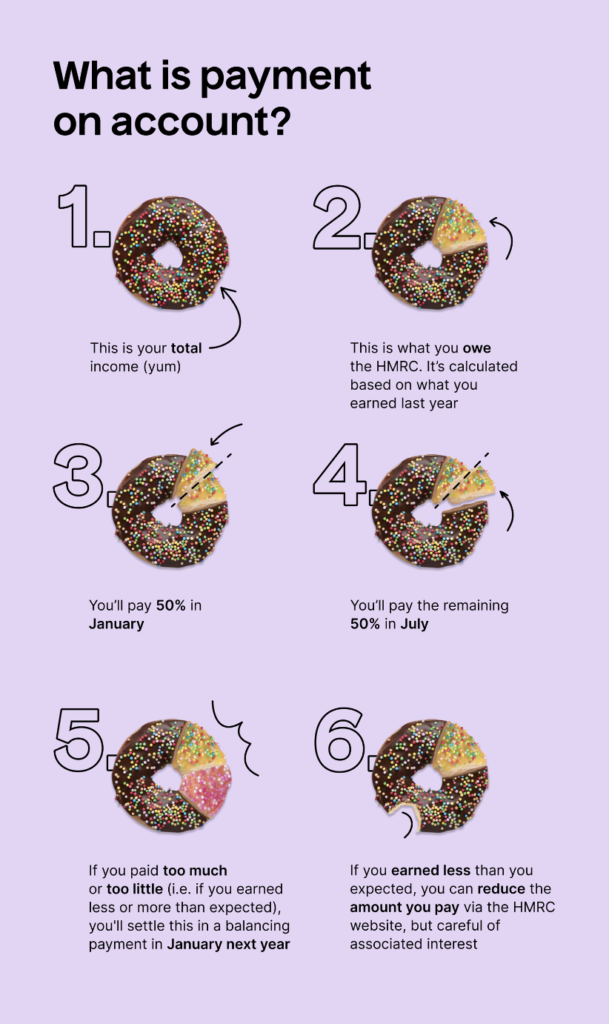
🚨 When registering for self-employment, you’re automatically enrolled into what is known as Payment on Accounts.
If you’re not quite sure how this works or why your first tax payment was 50% larger than expected, you can read more about this here or take a look below! 🚨For more details about how, when and why you need to register with HMRC as self-employed, check out our list of frequently asked questions about setting up as a sole trader.
If you want to stop being self-employed
You will need to tell HMRC – here is how you do it . HMRC will still expect you to file a tax return otherwise.
Once you’re registered, you’re ready to file!
Don’t wait any longer. Get your tax return sorted and filed by an accredited accountant. They’ll handle it all – no hassle and completely stress-free. Easy, online, and for a low, one-off fee.
File now