New name, same trusted service. Learn more
MTD for Landlords: Rules, Dates and What to Do Next
Key takeaways for landlords
What is Making Tax Digital? It’s not a new tax. It’s HMRC’s shift from annual Self Assessment tax returns to digital record-keeping and quarterly reporting through compatible software.
Who is this guide for? UK individual landlords and landlord-sole traders who currently file a Self Assessment tax return – whether you rent out one property or several.
The key start dates:
- 6 April 2026 – landlords (and sole traders) with qualifying income over £50,000 must comply
- 6 April 2027 – the threshold drops to qualifying income over £30,000
- 6 April 2028 (planned) – the threshold is expected to drop further to qualifying income over £20,000
Key MTD requirements for landlords:
- Keep digital records of all rental income and allowable expenses
- Use HMRC-recognised Making Tax Digital software
- Send quarterly updates to HMRC summarising your income and expenses
- Complete an end-of-year finalisation statement (instead of the traditional Self Assessment tax return)
Your action plan:
- Work out your qualifying income to see which start date applies to you (see the table below)
- Sign up for Making Tax Digital through your HMRC online account
- Choose compatible software
- Start keeping digital records of rental income and expenses
- Submit your first quarterly update by the relevant deadline
What is MTD for landlords?
Making Tax Digital for Income Tax replaces the traditional once-a-year Self Assessment tax return with a more regular, software-based approach. Here’s what changes in practice:
- Digital records – You’ll need to keep your rental income and expenses in MTD-compatible software rather than on paper or in basic spreadsheets. The software must be able to communicate directly with HMRC.
- Quarterly updates – Instead of totalling everything up once a year, you’ll send HMRC a summary of your income and expenses four times a year. These are cumulative updates, not mini tax returns – they don’t trigger a tax bill each quarter.
- End-of-year finalisation – After the final quarterly update, you’ll review your figures, add any adjustments (such as personal allowances or other income), and submit a finalisation statement. This replaces the Self Assessment tax return for your property income.
How does this differ from Self Assessment today? Right now, most landlords gather their records once a year (often in January), fill in a tax return, and submit it. Under MTD, the record-keeping happens throughout the year in software, and HMRC receives updates as you go. The idea is that by the time you reach the end of the tax year, most of the work is already done.
Why is the government Making Tax Digital for landlords?
The main aim is to switch all UK tax services from paper to digital, but it’s also because:
- It’s believed that MTD will help landlords avoid making common mistakes with tax. Not to mention this can help you to save time when it comes to managing your tax affairs. And of course, we all know how costly mistakes on your tax returns can be!
- It’ll save HMRC money. It’s estimated that the current process (including all those tax errors) costs them approx £10 billion every year!
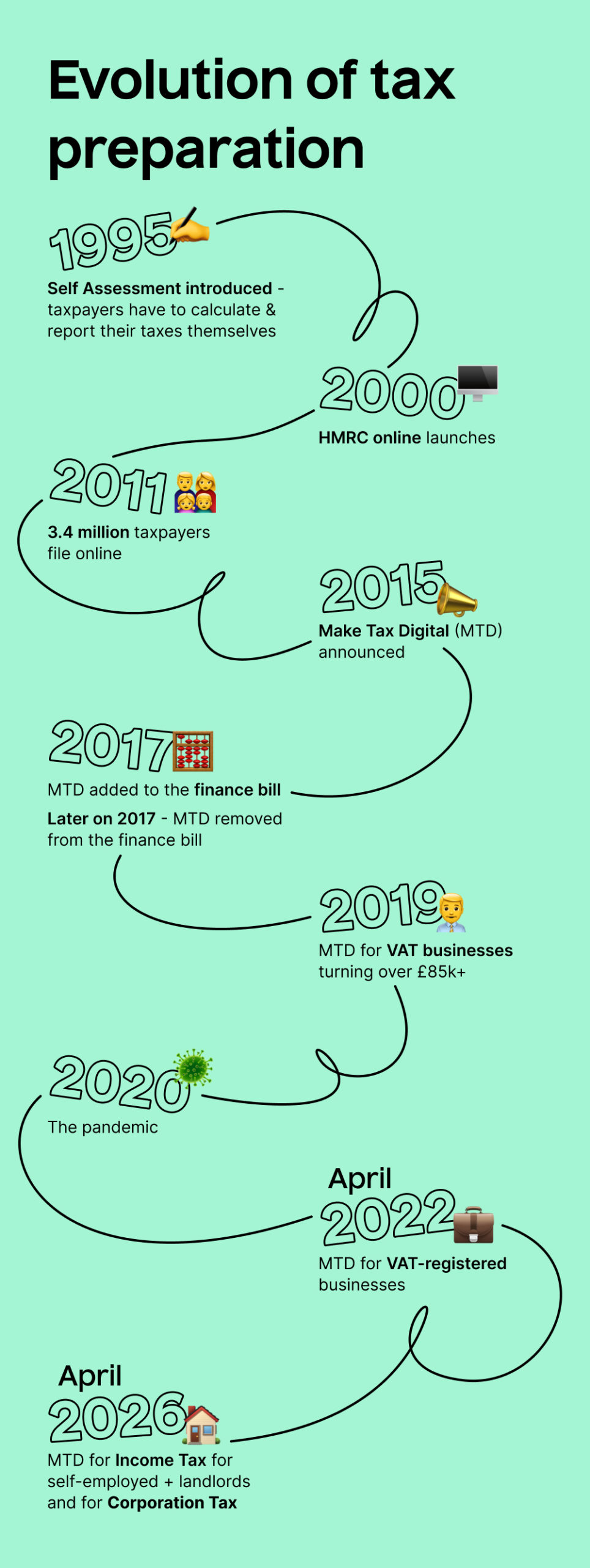
Who does MTD for landlords apply to?
The start dates and thresholds (April 2026 / April 2027)
| Start date | Qualifying income threshold | Based on tax year |
| 6 April 2026 | Over £50,000 | 2024/25 |
| 6 April 2027 | Over £30,000 | 2025/26 |
| 6 April 2028 (planned) | Over £20,000 | 2026/27 |
HMRC will use your Self Assessment tax return to identify whether you fall into each group. However, registration is not automatic – you’ll still need to sign up yourself
What “qualifying income” means
Qualifying income is your gross income (before expenses) from:
- UK property (residential lettings, commercial property, furnished holiday lettings)
- Overseas property
- Self-employment (sole trader income)
If you have income from both property and self-employment, these are combined to work out whether you hit the threshold.
Important: It’s your gross rental income that counts, not your profit. So even if your expenses bring your taxable profit well below £50,000, you may still be caught if your total rental receipts plus any sole trader turnover exceed the threshold.
Example: Sarah earns £32,000 a year in rental income from two buy-to-let properties. She also runs a small freelance business that brings in £22,000 a year. Her qualifying income is £32,000 + £22,000 = £54,000. Because this exceeds £50,000, Sarah must comply with MTD from 6 April 2026, based on her 2024/25 income.
Common landlord scenarios
“I only rent one property”
You still need to check your qualifying income. If the gross rent from that single property (combined with any self-employment income) exceeds the threshold, MTD applies to you.
“I’m employed (PAYE) and also rent property”
Your PAYE salary doesn’t count towards qualifying income — only property and self-employment income do. So if your only non-PAYE income is £25,000 in rent, you’re currently below the £50,000 threshold and won’t need to comply until the threshold drops further.
“I’m a landlord and self-employed”
Both income sources are added together. If the combined gross figure exceeds the relevant threshold, you’ll need to use MTD for all of those income sources.
“My income fluctuates year to year”
HMRC will look at the relevant tax year’s income to decide whether you need to join. If your income dips below the threshold one year, you may drop out of the requirement — but if it rises again, you’ll need to re-join. It’s worth keeping digital records regardless, so you’re prepared either way.
What if I’m a landlord that’s registered as a limited company?
MTD isn’t applicable to landlords who are registered as a limited company. Instead, you can continue sending limited company accounts and Corporation Tax to HMRC and Companies House.
What landlords need to do under MTD
Here’s a practical checklist of what’s required:
- Keep digital records: Record all rental income and allowable expenses (such as repairs, letting agent fees, insurance, and mortgage interest) in MTD-compatible software throughout the year
- Use compatible software: Your software must be able to send information directly to HMRC via their API. Spreadsheets alone won’t be enough unless they’re linked to bridging software
- Submit quarterly updates: Send HMRC a summary of your income and expenses four times a year, by the following deadlines:
| Quarter | Update due by |
| 6 April – 5 July | 7 August |
| 6 July – 5 October | 7 November |
| 6 October – 5 January | 7 February |
| 6 January – 5 April | 7 May |
Complete your end-of-year finalisation: After the fourth quarterly update, finalise your figures and submit your declaration by 31 January following the end of the tax year
Are there penalties for landlords under Making Tax Digital?
What software is compliant with MTD?
Once MTD for Income Tax is introduced, as a landlord, you, your accountant, or your tax service (like Taxfix!) will need to use MTD compatible software to update and report digital records of your rental income and expenses to HMRC.
It’s important if you or your accountant already use a type of software, that you check if it’s MTD compliant or not. You can do this here on HMRC’s website. The key points that make it compatible with MTD are:
- You can maintain business records as required by the regulations
- You can finalise your taxable business income and submit your declaration at the end of the tax year
- It allows you to communicate with HMRC digitally through their API (application programming interface) platform.
- You can prepare and send quarterly updates and statements to HMRC from your tax records
What “HMRC-recognised” means in practice:
The software must be able to communicate with HMRC’s systems through their API. This means it can send your quarterly updates and finalisation statement directly, without you needing to log in to HMRC’s website separately.
Typical options include:
- General accounting software that has added MTD for Income Tax functionality
- Landlord-specific tools designed around rental income and property expenses
- Bridging software that connects spreadsheets to HMRC’s API (if you prefer to keep using spreadsheets for day-to-day record-keeping)
What good software should do:
- Capture and categorise rental income and expenses
- Store digital copies of receipts and invoices
- Produce and submit quarterly updates to HMRC
- Keep an audit-friendly trail of all your records
- Handle the end-of-year finalisation process
Taxfix’s Making Tax Digital software for landlords comes with built-in accountant support
MTD for landlords: How to prepare
Even if your start date isn’t until April 2027 or later, getting ready early will make the transition much smoother. Here’s a step-by-step guide:
1. Check your qualifying income: Look at your most recent Self Assessment tax return. Add up your gross property income and any self-employment income. If the total exceeds £50,000 (for the 2024/25 tax year), you need to be ready for April 2026. If it exceeds £30,000 (for the 2025/26 tax year), your deadline is April 2027.
2. Sign up with HMRC: You’ll need to register for MTD for Income Tax through your Government Gateway account. HMRC may contact you if they believe you’re in scope, but don’t wait — registration is your responsibility.
3. Choose your software: Pick an HMRC-compatible product that suits the way you manage your properties. If you already use an accountant, check whether their software covers MTD submissions.
4. Start keeping digital records now: Even before your mandatory start date, get into the habit of recording income and expenses digitally. This makes the switch far less disruptive.
5. Talk to your accountant: If you use an accountant or tax adviser, discuss how MTD will work in practice. They can submit quarterly updates on your behalf using their own compatible software, or help you get set up to do it yourself.
6. Consider joining the pilot: HMRC has been running a live pilot for MTD for Income Tax. Joining early lets you test the process and iron out any issues before it becomes mandatory.
How do landlords calculate their income for Making Tax Digital? See the example below:
Tom owns three rental properties. In the 2024/25 tax year, his gross rental income is: Property 1: £18,000 | Property 2: £14,400 | Property 3: £21,600 | Total: £54,000. His allowable expenses total £12,000, giving him a taxable profit of £42,000. But for MTD purposes, it’s the £54,000 gross figure that determines whether he’s in scope — and since it exceeds £50,000, Tom must comply from 6 April 2026.
Still need help calculating your rental income?
Use our rental income tax calculator
Who is exempt from MTD?
Not everyone above the income threshold will need to comply. You may be exempt if:
- You are digitally excluded: If you can’t use computers or the internet because of age, disability, remoteness of location, or any other reason, you can apply for an exemption. This mirrors the exemptions already in place for MTD for VAT.
- Your religion prevents you from using digital tools on certain days: HMRC can make accommodations in specific circumstances.
- You’re already exempt from other HMRC digital services: If you have an existing exemption from MTD for VAT, the same exemption should carry across to MTD for Income Tax.
How to apply for an exemption:
You can contact HMRC by phone or in writing to request an exemption. You don’t need to apply online — the process is deliberately accessible to those who find digital tools difficult. HMRC will assess your circumstances and confirm whether you qualify.
I’m a landlord and I need Making Tax Digital help!
If you’re a landlord who makes over £30,000 a year in taxable income and are confused by the upcoming MTD changes, then don’t worry. Get in touch with us for some simple, one-off tax advice from one of our accredited accountants. You can learn more here.
Still got questions?
Get in touch with our UK-based support team either at [email protected] or via the live chat on our homepage. They’re happy to help.
Frequently asked questions
Do landlords have to do MTD?
Yes, if your qualifying income from property (and any self-employment) exceeds the relevant threshold. From 6 April 2026, this applies to landlords with qualifying income over £50,000, and from 6 April 2027, the threshold drops to £30,000. If your income is below these levels, you can continue using Self Assessment as normal for now.
What does MTD mean for property owners?
Making Tax Digital means you’ll need to keep digital records of your rental income and expenses using compatible software, and send HMRC quarterly updates instead of filing a single annual tax return. It doesn’t change how much tax you owe — just how you report it.
Can my accountant submit Making Tax Digital reports on my behalf?
Yes. Your accountant can use their own MTD-compatible software to submit quarterly updates and your end-of-year finalisation on your behalf. Many landlords prefer this approach, especially in the early stages. Taxfix’s MTD service pairs you with a dedicated accountant who handles the submissions for you.
What are the new tax rules for landlords?
MTD for Income Tax isn’t a new tax or a change to how much you owe. It’s a change to how you report your income. The key differences are: digital record-keeping (instead of paper), quarterly updates to HMRC (instead of one annual return), and the use of HMRC-compatible software. The tax calculations, allowances, and rates themselves remain the same.
Do landlords have to submit quarterly tax returns?
Not exactly. The quarterly updates are summaries of your income and expenses — they’re not full tax returns and they don’t trigger a tax payment. Think of them as progress reports. Your actual tax liability is calculated at the end of the year when you submit your finalisation statement.
What happens if I miss a submission deadline?
HMRC uses a points-based penalty system for MTD. Each time you miss a quarterly update deadline, you receive a penalty point. Once you accumulate a set number of points (currently two points for quarterly obligations), you’ll receive a £200 financial penalty — and another £200 for each subsequent late submission while you’re at the penalty threshold. Late payment of tax attracts separate interest and penalties.
This article provides general information only and is not personalised tax advice.
Looking for tax help?
Or see our Guides, Calculators or Taxopedia