New name, same trusted service. Learn more
What does Making Tax Digital mean for self-employed?
Making Tax Digital for Income Tax is changing how self-employed individuals report their income to HMRC from April 2026. If your qualifying income exceeds £50,000, you’ll need to keep digital records and submit quarterly updates using MakingTax Digital software. This guide explains who’s affected, when the changes start, and what you need to do to prepare.
Our Making Tax Digital (MTD) software for landlords and sole-traders with built-in accountant support is now live. First month for free!
- Accountant-led onboarding & support
- Simple-to-use software
- Affordable pricing options – from £24.99/month
Key takeaways for self-employed
MTD for self-employed – key requirements:
1. Keep digital records of all business income and expenses
2. Use Making Tax Digital software recognised by HMRC
3. Submit quarterly updates (four times per year)
4. Complete an end-of-period statement annually
5. Submit a final declaration each tax year
Action plan for self-employed:
6. Check if your qualifying income is over £50,000 (2026) or £30,000 (2027)
7. Choose Making Tax Digital software before your deadline
8. Sign up for Making Tax Digital for Income Tax via HMRC
9. Start keeping digital records 6–12 months before your start date
10. Set quarterly reminders for submission deadlines
Does Making Tax Digital apply to self-employed?
That depends on how much you earn. Making Tax Digital for Income Tax is being rolled out in phases, based on your qualifying income – that’s the combined gross income from self-employment and property (before expenses). Income from PAYE employment doesn’t count towards this threshold
Who needs to comply and when
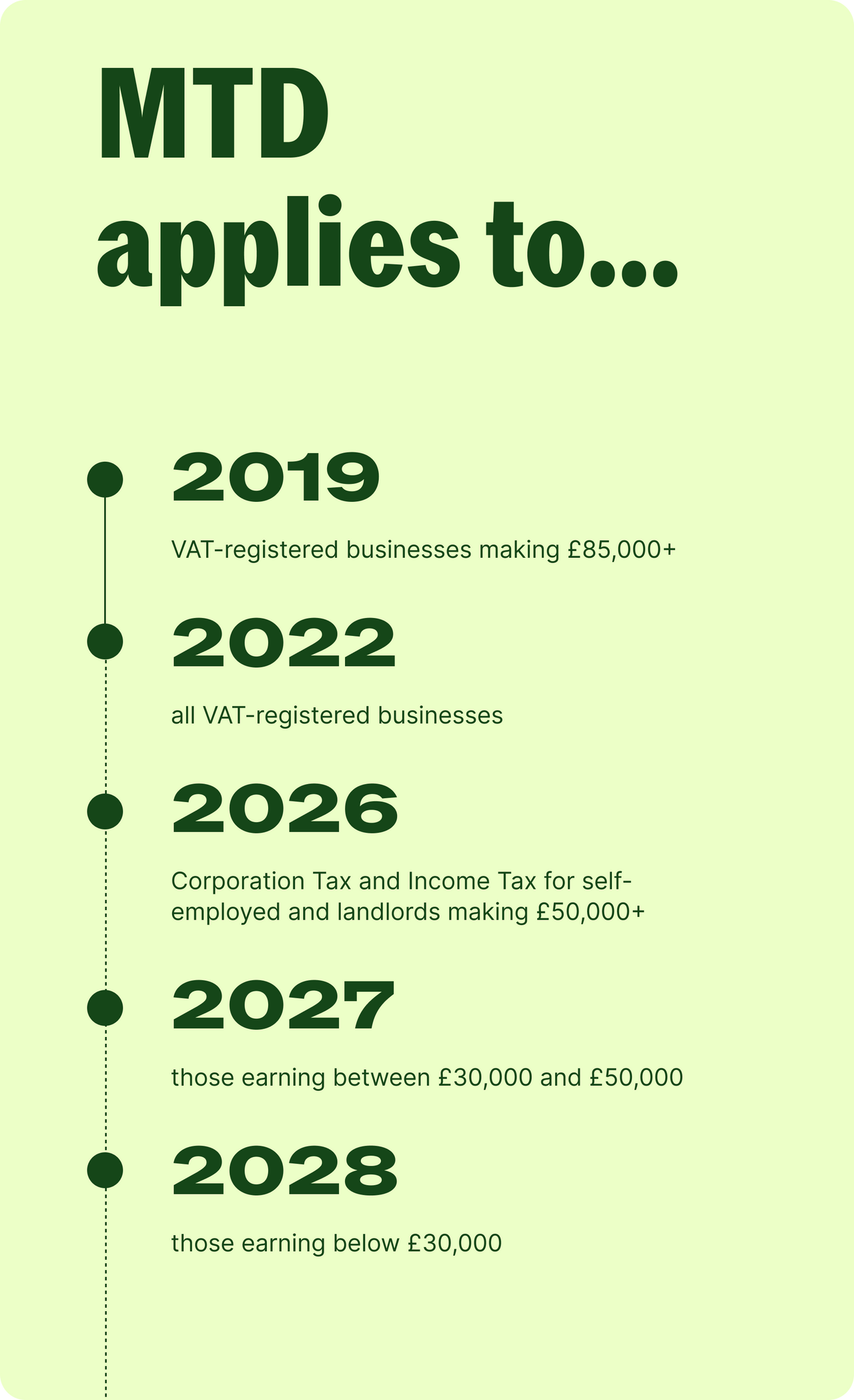
• 6 April 2026: qualifying income over £50,000
• 6 April 2027: qualifying income over £30,000
• 6 April 2028: qualifying income over £20,000 (planned)
What “qualifying income” means
Qualifying income is your gross income (before expenses) from self-employment and/or property. It does not include income from PAYE employment.
Example:
You have a PAYE salary of £40,000 and self-employment income of £15,000. Your qualifying income is £15,000 – so Making Tax Digital for Income Tax would not apply to you in 2026 or 2027.
Common self-employed scenarios
• “I’m fully self-employed with £60,000 turnover” – MTD applies from 6 April 2026.
• “I have a PAYE job earning £45,000 and self-employment income of £25,000” – Your qualifying income is £25,000. MTD does not apply until the £20,000 threshold in 2028 (planned).
• “I’m self-employed (£35,000) and also a landlord (£20,000)” – Combined qualifying income is £55,000. MTD applies from 6 April 2026.
• “My self-employment income varies year to year” – MTD is triggered when your qualifying income exceeds the threshold in a given tax year. If your income drops below the threshold in a later year, contact HMRC.
When does Making Tax Digital start for self-employed?
Making Tax Digital for Income Tax is already live for some self-employed people. Your start date depends on your qualifying income:
• From 6 April 2026: if your qualifying income exceeds £50,000
• From 6 April 2027: if your qualifying income exceeds £30,000
• From 6 April 2028: if your qualifying income exceeds £20,000 (planned)
You enter MTD when your qualifying income first exceeds the relevant threshold. HMRC recommends starting to prepare at least six months before your start date. So if you’re above the £50,000 threshold, now is the time to act.
👉 Want to know exactly when MTD applies to you? See our full Making Tax Digital timeline →
Quarterly update deadlines
Once you’re in MTD, you’ll need to submit four quarterly updates each year. Here are the deadlines:
• Quarter 1 (6 April – 5 July): due by 7 August
• Quarter 2 (6 July – 5 October): due by 7 November
• Quarter 3 (6 October – 5 January): due by 7 February
• Quarter 4 (6 January – 5 April): due by 7 May
Important: you must sign up for Making Tax Digital for Income Tax via HMRC before your start date. Don’t wait until your first quarterly deadline.
What will I need to submit for MTD if I’m self-employed?
Once Making Tax Digital for Income Tax comes into effect, you’ll no longer use HMRC’s website to file your tax return. Instead, you’ll keep and submit digital records of your earnings and expenses using Making Tax Digital software.
There are three things you’ll need to submit:
• Quarterly updates of your income and expenses
• An end-of-period statement — one per year for each source of income
• A final declaration that details all other taxable income (such as investments and savings interest)
After each quarterly update, you’ll receive an estimate of the tax due up to that point. You’ll still pay your tax bill on the usual deadlines (31 January and 31 July). The idea is to help you budget more easily throughout the year.
What information goes in quarterly updates
Each quarterly update is a summary – not a transaction-by-transaction breakdown. You’ll need to include:
• Total business income for the quarter
• Total allowable business expenses for the quarter
• A summary by category (not individual transactions)
• Any adjustments or corrections from previous quarters
Will I still file a Self Assessment tax return?
Not exactly. Making Tax Digital for Income Tax replaces the annual Self Assessment tax return for self-employed people and landlords above the income thresholds. Instead, you’ll submit quarterly updates throughout the year.
However, for the 2025-26 tax year, you’ll still need to file one final self-assessment, since this period isn’t covered by the MTD timeline. This doesn’t have to be stressful. Free self-assessment filing is available if you subscribe to Taxfix’s MTD Assistance or MTD Full Support services.
You’ll also still need to submit a “final declaration” at the end of each tax year. This is similar to a tax return and covers any other income you have – such as savings interest, dividends, capital gains, or PAYE income. Your tax payment deadlines remain unchanged: 31 January and 31 July.
What happens if I miss a quarterly submission deadline?
Missing a quarterly update deadline will earn you a penalty point – think of it like points on a driving licence. Once you reach a certain number of points (typically four), you’ll receive a £200 fine.
How the points system works
• 1 point per late quarterly update
• Points accumulate over 12 months
• £200 penalty after reaching the threshold (typically 4 points)
• Points reset after a compliance period
There’s also a late payment penalty system. Late payers can be fined up to 4% of the outstanding amount. That said, these new penalties are generally less harsh than the current Self Assessment late filing fines.
Late on your current submission? Need help figuring out how much your penalty will cost? Use our late tax return penalty calculator.
Who is exempt from Making Tax Digital?
Most self-employed people will need to comply with Making Tax Digital for Income Tax. However, HMRC does grant exemptions in certain circumstances.
Digital exclusion exemptions
You may be eligible for an exemption if:
• Age, disability, or religious reasons make it impractical to use digital tools
• You live in a remote location with no reliable internet access
• Your religious society’s beliefs are incompatible with electronic communications
• Other reasonable grounds apply
How to apply for an exemption
1. Contact HMRC and explain your circumstances
2. Provide evidence if requested
3. HMRC will review your case and notify you of their decision
4. Exemptions may need to be renewed periodically
What software is compatible with Making Tax Digital?
What Making Tax Digital software does
Making Tax Digital software must be able to:
• Keep digital records of income and expenses
• Categorise transactions
• Generate quarterly update summaries
• Submit updates directly to HMRC via API
• Maintain an audit trail for five or more years
Types of Making Tax Digital software
- Accounting software: full-featured platforms for businesses with more complex needs
- Bookkeeping apps: simpler tools designed for sole traders
- Bridging software: connects existing spreadsheets to HMRC
- Taxfix Making Tax Digital software: an accountant-supported option that combines software with expert guidance
- HMRC maintains a full list of compatible software.
How to prepare for Making Tax Digital as self-employed
1. Calculate your qualifying income (self-employment + property, before expenses)
2. Check which start date applies to you based on your income level
3. Research and choose a Making Tax Digital software
4. Sign up for Making Tax Digital for Income Tax via HMRC online services
5. Start keeping digital records 6–12 months before your deadline
6. Set up quarterly reminders for submission deadlines7. Consider professional support if your tax situation is complex
A lot to prepare? Taxfix is here to make your filing as simple and easy as possible. Find out more about Taxfix Making Tax Digital software →
Get making tax digital advice from Taxfix
Navigating Making Tax Digital for Income Tax doesn’t have to be stressful. Taxfix connects you with UK-qualified accountants who can guide you through every step – from choosing the right software to submitting your quarterly updates.
Here’s what’s included:
• Making Tax Digital software with built-in accountant support
• Onboarding help and setup assistance
• Ongoing support throughout the year
• Affordable pricing – from £4.99/month, first 3 months free
Frequently asked questions
Do self-employed people have to switch to make tax digital?
Yes, if your qualifying income (from self-employment and/or property) exceeds the relevant threshold. The threshold is £50,000 from April 2026, £30,000 from April 2027, and £20,000 from April 2028 (planned). If you’re below the threshold, you don’t need to comply yet.
What does Making Tax Digital mean for self-employed?
It means you’ll need to keep digital records of your income and expenses, use Making Tax Digital software, and submit quarterly updates to HMRC instead of a single annual tax return. You’ll also submit a final declaration at the end of each tax year.
When does Making Tax Digital start for self-employed?
It depends on your qualifying income. The start dates are: 6 April 2026 (income over £50,000), 6 April 2027 (income over £30,000), and 6 April 2028 (income over £20,000, planned).
Is a self-employed tax return going digital?
Yes. Making Tax Digital for Income Tax replaces the annual Self Assessment tax return with quarterly updates and a year-end final declaration. The final declaration covers all your income sources, not just self-employment. However, for the 2025-2026 tax year, you’ll still have to file a self-assessment tax return.
Can my accountant submit Making Tax Digital reports on my behalf?
Yes. You can authorise an accountant or tax agent to submit your quarterly updates and final declaration through Making Tax Digital software. Taxfix offers an accountant-supported service that handles this for you.
What are the new self-employed tax rules?
The main change is Making Tax Digital for Income Tax, which requires digital record-keeping and quarterly reporting. Basis period reform (which changed how self-employed profits are calculated) also came into effect from the 2024/25 tax year. National Insurance rates for the self-employed have also been updated in recent years. Check the latest HMRC guidance for current figures.
How will Making Tax Digital work for self-employed?
You’ll use Making Tax Digital software to record your income and expenses throughout the year. Every quarter, the software will generate a summary that you (or your accountant) submit to HMRC. At the end of the tax year, you’ll complete a final declaration covering all your income.
What happens if I miss a quarterly submission deadline?
You’ll receive a penalty point. Once you accumulate enough points (typically four), you’ll be fined £200. There are also late payment penalties of up to 4% of the outstanding amount. HMRC may waive penalties if you have a reasonable excuse.
How do I register as self-employed for Making Tax Digital?
You’ll first need to be registered for Self Assessment with HMRC. Once registered, you can sign up for Making Tax Digital for Income Tax through your HMRC online account. You’ll need to have chosen your Making Tax Digital software before signing up.
Do I need an accountant for Making Tax Digital?
No, but it can make things a lot easier, especially if your tax situation is complex. An accountant can help you choose the right software, set up your records correctly, and make sure your quarterly updates are accurate. Taxfix offers Making Tax Digital software from £4.99/month.
This article provides general information only and is not personalised tax advice.
Looking for tax help?
Or see our Guides, Calculators or Taxopedia